Payment Processor vs Payment Gateway: Quick Answer
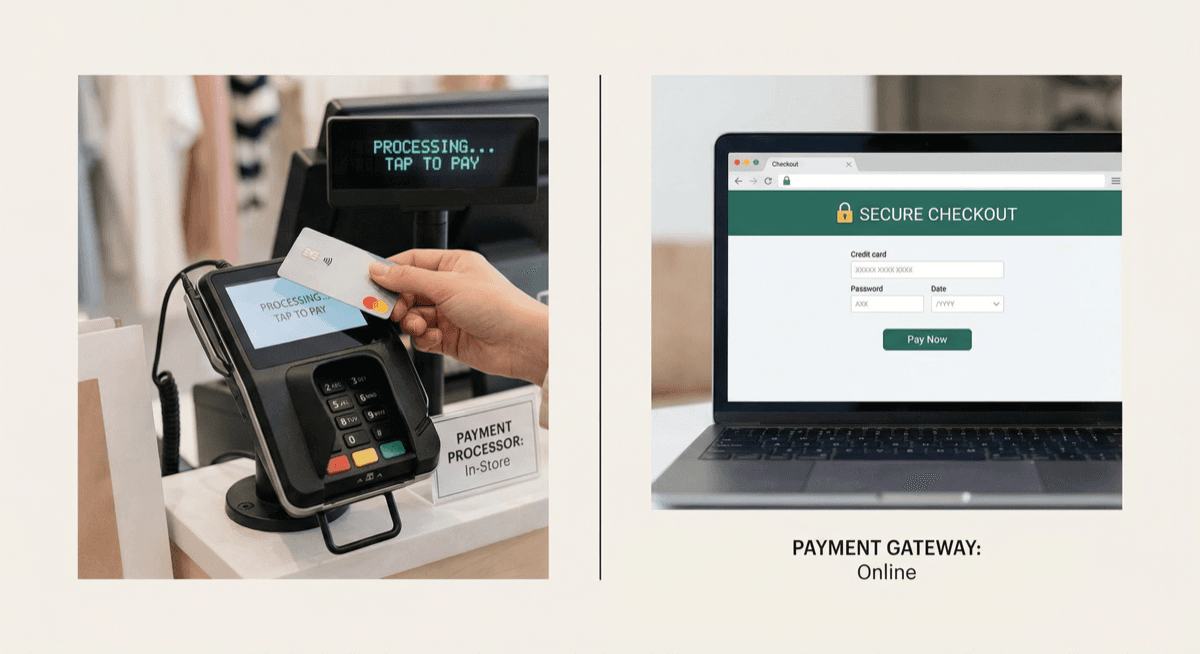
A payment processor handles the actual authorization and settlement of credit card transactions — moving money from the customer's bank to yours.
A payment gateway is the secure technology that captures and encrypts card data for online or card-not-present transactions, then sends it to the processor.
In simple terms: The gateway is the front door. The processor is the engine.
What Does a Payment Processor Do?
The payment processor is responsible for:
- Routing transaction data between your business, the card networks (Visa/Mastercard), and the customer's issuing bank
- Getting authorization (approved or declined) in real time
- Settling funds — moving money into your merchant account
- Managing chargebacks and disputes
- Providing merchant statements and reporting
Every business that accepts cards needs a payment processor. Without one, card transactions cannot be completed.
What Does a Payment Gateway Do?
The payment gateway is responsible for:
- Securely capturing card details on your website or virtual terminal
- Encrypting card data so it can't be intercepted in transit
- Sending the encrypted data to the payment processor
- Returning the authorization response (approved/declined) to your checkout
- Supporting features like tokenization, recurring billing, and fraud screening
Who needs a gateway? Any business that accepts payments online, over the phone, or via invoice (card-not-present). If you only accept in-person payments with a physical terminal, you may not need a separate gateway.
How They Work Together
Here's the actual flow when a customer pays on your website:
1) Customer enters card info on checkout
The payment gateway encrypts the card data using SSL/TLS.
2) Gateway sends data to the processor
The encrypted transaction is forwarded to your payment processor.
3) Processor routes to the card network
The processor sends the transaction to Visa, Mastercard, etc.
4) Card network contacts the issuing bank
The customer's bank checks for funds and fraud.
5) Response flows back
Approved or declined — the response goes from the bank → network → processor → gateway → your website. The customer sees the result.
6) Settlement
At the end of the day, the processor batches all approved transactions and settles funds to your merchant account.
Do You Need Both?
In-store only (card-present)
You need a payment processor and a POS terminal. The terminal handles encryption and communication directly with the processor. No separate gateway needed.
Online only (eCommerce)
You need both — a payment gateway to capture online card data and a payment processor to settle transactions.
In-store + online (omnichannel)
You need all three — a POS terminal for in-store, a gateway for online, and a processor that ties them together with unified reporting.
Popular Payment Gateways
- PayTrace — Popular with B2B merchants and high-risk industries
- Authorize.Net — Widely used, integrates with most shopping carts
- NMI (Network Merchants) — Developer-friendly, multi-processor support
- USAePay — Robust API, popular with ISOs and resellers
Unison Payment Solutions integrates with all major gateways and can help you choose the right one for your business model.
Common Mistakes
Mistake 1: Using a payment aggregator thinking it includes everything Square and Stripe bundle gateway + processor, but their flat rates are expensive at volume, and account stability is uncertain for higher-risk merchants.
Mistake 2: Paying for a gateway you don't need If you only do in-store sales, you don't need a gateway subscription. Your terminal communicates directly with the processor.
Mistake 3: Not checking gateway compatibility Make sure your gateway integrates with your eCommerce platform (Shopify, WooCommerce, Magento, etc.) before signing up.
How Unison Helps
We provide both payment processing and payment gateway solutions, configured for your business:
- In-store: Clover, PAX, and Dejavoo terminals connected to our processing network
- Online: PayTrace, Authorize.Net, or NMI gateway integration
- Omnichannel: Unified processing across in-store and online with consolidated reporting
- High-risk: Gateway + processor setups specifically underwritten for CBD, supplements, gaming, and more
FAQ
Is a payment gateway the same as a payment processor? No. The gateway handles data capture and encryption for online payments. The processor handles authorization, clearing, and settlement.
Can I use any gateway with any processor? Not always. Some gateways are processor-specific. We help match the right gateway to your processor and business type.
Do I need a gateway for mobile payments? If you use a mobile card reader (like Clover Go), the reader handles encryption and connects to the processor — no separate gateway needed. For mobile web payments, you do need a gateway.
Choosing the Right Gateway for Your Business
Not all payment gateways are created equal. The best choice depends on your business model:
For eCommerce stores (Shopify, WooCommerce, BigCommerce)
Look for gateways with pre-built plugins for your platform. PayTrace and Authorize.Net offer integrations with all major shopping carts. Make sure the gateway supports tokenization for saved cards and recurring billing if you offer subscriptions.
For [B2B and invoice-heavy businesses](/blog/b2b-merchant-services-guide)
If you send invoices and accept payments over the phone, you need a gateway with a strong virtual terminal (browser-based interface for keying in card numbers) and Level 2/Level 3 data support to qualify for lower interchange on corporate and purchasing cards.
For high-risk industries
Not all gateways support high-risk merchants. PayTrace is popular in the high-risk space because it integrates with processors that specialize in CBD, supplements, gaming, and other elevated-risk verticals.
For omnichannel businesses (in-store + online)
You want a gateway and processor that can unify your in-store and online transactions into a single reporting dashboard. This simplifies accounting, reconciliation, and gives you a complete view of your sales across all channels.
Total Cost of Ownership
When comparing gateways, look beyond the monthly fee:
- Monthly gateway fee: $10 to $25/month is typical
- Per-transaction fee: $0.05 to $0.10 per transaction on top of processing
- Setup fees: Should be $0 — avoid gateways that charge setup fees
- PCI compliance: The gateway should handle the heaviest PCI requirements so your compliance burden is lighter (SAQ A instead of SAQ D)
- Developer costs: If you need custom integration, check API documentation quality and developer support
Key Takeaway
The simplest way to think about it: the payment processor moves money. The payment gateway secures online transactions. If you sell in person, you need a processor and terminal. If you sell online, you need all three — processor, gateway, and a secure checkout integration.