Peptides Merchant Account
Specialized Payment Processing for the Research Industry
What is a peptides & research chemicals merchant account?
A peptide merchant account is a dedicated high-risk payment processing account for research-supply and ecommerce businesses that sell peptides. Approval depends on website compliance, product positioning, chargeback history, and underwriting — not a generic Stripe or Square signup. Unison helps research suppliers get underwritten with acquiring banks that understand the category, typically in 3–7 business days when documentation is complete. Merchant account approval rates for prepared applications exceed 80%; card authorization rates at the gateway are separate and often reach 96%+ for properly configured accounts.
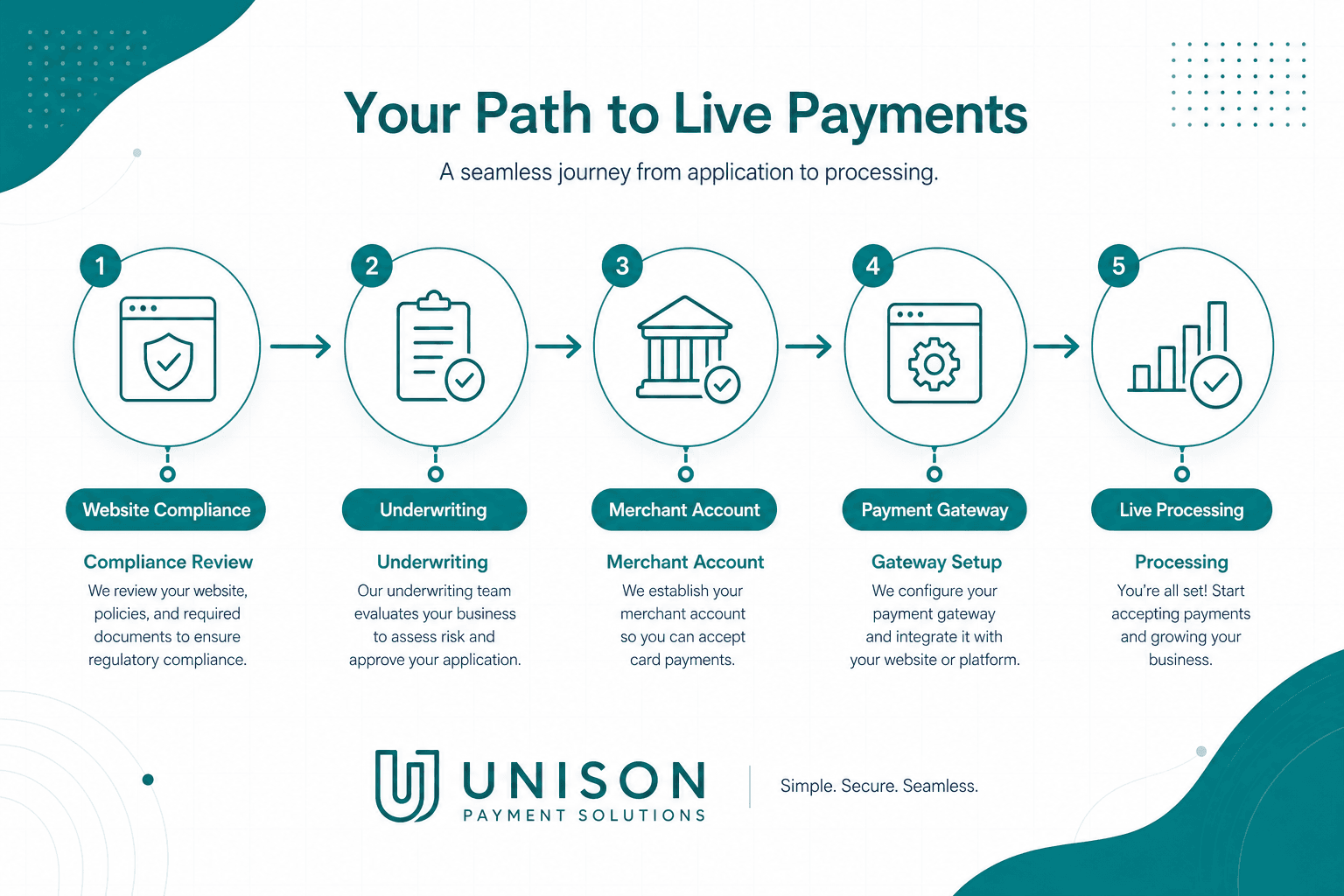
The peptide and research chemical industry requires specialized payment processing that understands your unique compliance needs. Unison Payment Solutions provides secure, high-approval merchant accounts designed specifically for your industry.
Who This Is For
- ✓Research-only peptide suppliers with clear disclaimers and compliant product pages
- ✓Established ecommerce brands with processing history and documented fulfillment
- ✓Businesses using WooCommerce, Shopify (third-party gateway), or BigCommerce
- ✓Merchants recovering after Stripe, Square, or PayPal shutdowns with corrected compliance
Who We Cannot Support
- ✕Sites making human-consumption, medical, or disease-treatment claims
- ✕Businesses without refund, shipping, and terms policies published on-site
- ✕Operators selling restricted compounds without proper documentation
- ✕Merchants seeking guaranteed approval regardless of compliance gaps
Why Traditional Processors Decline This Industry
- Chargebacks and dispute ratios above acquirer thresholds
- Product claims that trigger card-network BRAM monitoring
- MCC mismatch between stated business type and actual products sold
- Missing or non-compliant website policies and contact information
- Gateway/processor mismatch — high-risk volume on low-risk platforms
- Transaction laundering concerns when checkout does not match underwriting profile
What Underwriters Check
- •Website policies: terms, privacy, refund, shipping, and research-use disclaimers
- •Product descriptions — no health claims; research/laboratory positioning where applicable
- •COAs, lab documentation, or supplier verification where relevant to your catalog
- •Billing descriptor alignment with your brand name on statements
- •Business formation docs, EIN, owner ID, and voided check
- •Processing and chargeback history from prior statements (if applicable)
- •Fulfillment model — inventory proof, 3PL agreements, or shipping SLAs
Approval Process
- 1
Pre-application & compliance review
10-minute intake plus optional website review before you submit to underwriting. Fix policy gaps and descriptor issues early.
- 2
Compliance documentation
Submit business docs, bank statements, and inventory or supplier proof. Incomplete packages delay approval.
- 3
Underwriting with high-risk acquirer
We present your file to peptide-experienced banks. Timeline: 3–7 business days typical; complex files may take longer.
- 4
Gateway & cart setup
PayTrace, NMI, or Authorize.net configured for your WooCommerce, Shopify, or BigCommerce store.
- 5
Processing & monitoring
Ongoing chargeback alerts, descriptor review, and account health monitoring after go-live.
Gateway & Platform Compatibility
Platform availability depends on underwriting and gateway configuration. View integrations →
Rates, Interchange-Plus & Rolling Reserves
Peptide processing uses interchange-plus pricing: wholesale interchange and assessments plus a disclosed markup. High-risk categories cost more because acquirers carry elevated chargeback and compliance exposure — exact rates depend on volume, ticket size, chargeback history, and product mix. We do not quote guaranteed rates without underwriting.
Rolling reserves hold a percentage of daily volume (often 5–10%) for 90–180 days. Reserves are common in high-risk onboarding and may decrease after clean processing history. Unusually high reserve demands without explanation can be a red flag — we explain reserve terms before you sign.
Chargeback Prevention
- →Use clear billing descriptors that match your domain and brand
- →Publish refund and shipping policies; honor them consistently
- →Provide tracking and delivery confirmation for every order
- →Respond to customer support inquiries within 24 hours
- →Enable Ethoca/Verifi/Midigator early-warning alerts where available
- →Make refund requests easier than filing a chargeback
Peptides & Research Chemicals Case Study
An online peptide supplier was declined by five mainstream processors and lost roughly $45K/month in card revenue over three months. Unison matched the business with a high-risk acquirer experienced in research-supply underwriting. Account approved in 3 business days with PayTrace gateway integration.
Before: Declined 5 times, account frozen twice, no stable card processing.
After: 0.4% chargeback ratio, 12+ months stable processing, $45K+ monthly card revenue restored.
Gateway: PayTrace · Approval timeline: 3 business days
Client name withheld due to banking/privacy restrictions; documentation reviewed by Unison and available internally.
Get reviewed before you apply
Avoid another processor shutdown. Start with a 10-minute pre-application and compliance check.
Payment Processing for Peptides & Research Chemicals
The peptide and research chemical industry operates in a unique regulatory environment that traditional payment processors simply don't understand. Banks and processors see "research chemicals" and immediately flag your application—not because your business is problematic, but because they lack the expertise to evaluate it properly.
Unison Payment Solutions is a payment and merchant services provider that helps high-risk and research-supply businesses accept cards and reduce processing costs through dedicated merchant accounts and gateway flexibility. We specialize in high-risk merchant accounts for peptide companies, and peptides are one of our areas of deep expertise.
Two metrics merchants confuse: *Merchant account approval rate* (underwriting — whether you get a live MID) is separate from *card authorization approval rate* (whether individual transactions approve at the gateway). Unison reports 80%+ merchant account approval for prepared peptide applications; configured gateways often see 96%+ transaction authorization rates. These are not the same number.
We understand the difference between legitimate research suppliers and problematic operators. We know what compliance documentation matters and how to present your business to underwriters. Visit our Peptide Payments Compliance Hub for checklists, policy templates, and risk controls.
Our merchant account approval rates for peptide businesses exceed typical industry averages because we work with acquiring banks that understand the space. These aren't general-purpose processors making nervous decisions—they're specialized partners with peptide underwriting experience.
Once approved, your account is structured for long-term stability. High-risk accounts on generic platforms face sudden terminations, rolling reserve holds, and poor support. We underwrite for your actual business model with dedicated account managers. If your account was shut down, see what to do when your peptide merchant account is terminated.
Why Stripe, Square, and PayPal fail peptide sellers: Aggregators use automated risk models that flag MCCs, product keywords, and dispute patterns common in research ecommerce. Even compliant businesses get frozen because the platform was never underwritten for the category. You need a dedicated high-risk merchant account—not a workaround that gets discovered at scale.
What underwriters evaluate: Website policies (terms, privacy, refund, shipping), product page language, research-use positioning, billing descriptors, fulfillment proof, chargeback history, and business documentation. LegitScript certification may help with some acquirers but is not universally required—requirements vary by bank partner. We guide you through what your specific file needs.
We provide chargeback protection peptide businesses need. Research ecommerce sees higher dispute rates from customer confusion, shipping delays, and fraud. Midigator and Ethoca/Verifi alerts provide early warning and dispute management.
If peptide payments keep getting declined, the processor often isn't underwritten for the category. Specialized underwriting eliminates decline issues that plague merchants on generic platforms.
Gateway compatibility: WooCommerce, Shopify with third-party gateway, BigCommerce, Authorize.net, NMI, and PayTrace. Platform availability depends on underwriting outcome.
International shipping is standard. We support multi-currency processing where approved—customers pay in local currency while you settle in USD.
Pricing and reserves: Interchange-plus pricing with rates depending on volume, ticket size, chargeback history, and product mix. Rolling reserves (often 5–10% for 90–180 days) may apply for high-risk onboarding. We explain reserve terms before boarding—approval and pricing are not guaranteed without underwriting.
Ready to start? Apply for peptide processing online — intake takes about 10 minutes; underwriting typically 3–7 business days with complete documentation.
⚠Industry Challenges
- ✕Traditional processors decline peptide merchant applications
- ✕Frequent account terminations and reserve holds
- ✕Higher chargeback rates from shipping delays and customer confusion
- ✕Compliance complexity with research chemical regulations
- ✕International transaction requirements and multi-currency needs
- ✕Finding processors who understand the industry
- ✕Account stability concerns affecting business planning
- ✕Limited payment options reducing customer convenience
✔Our Solutions
- ✓High-risk merchant accounts — 80%+ approval for prepared peptide applications (underwriting)
- ✓Stable accounts underwritten for long-term relationships
- ✓Midigator chargeback prevention and alert integration
- ✓Multi-currency processing for international customers
- ✓Dedicated account managers who understand peptide compliance
- ✓Fraud prevention tools tailored to research product patterns
- ✓Multiple payment method support (cards, ACH, crypto where applicable)
- ✓LegitScript certification support with discounted fees as a partner processor
- ✓Flexible processing limits that grow with your business
Benefits for Your Business
What We Offer for Peptides & Research Chemicals
Comprehensive solutions designed for your specific industry needs.
High Approval Rates
Our underwriting team specializes in peptide and research chemical businesses. Prepared applications to peptide-experienced acquiring banks see 80%+ merchant account approval — a separate metric from per-transaction authorization rates at the gateway.
Chargeback Protection
Midigator integration prevents chargebacks before they happen with early alerts and proactive intervention. When disputes occur, automated evidence gathering improves win rates. Keep your ratio healthy and your account stable.
Global Processing
Serve researchers worldwide with multi-currency support. Accept payments in 135+ currencies with automatic conversion. International cards process at competitive rates without declined transactions.
Stable Long-Term Accounts
Unlike processors that terminate peptide accounts unexpectedly, our accounts are underwritten for stability. Dedicated support addresses issues proactively. Build your business with confidence.
Fraud Prevention
Advanced fraud detection tuned for research chemical transaction patterns. Block fraudsters while approving legitimate researchers. Reduce chargebacks at the source.
LegitScript Certification Support
As a LegitScript partner processor, we help peptide merchants navigate certification when their acquirer requires it. Requirements vary by bank — we review your file and advise whether LegitScript strengthens your application.
Fast Payouts
Most transactions settle within 48 hours. No excessive reserve holds. Healthy cash flow for business operations and inventory investment.
Explore Peptides & Research Chemicals Payment Topics
Dive deeper into specific payment processing solutions for your industry.
BPC-157 Supplier Payment Processing
Specialized Merchant Accounts for BPC-157 Research Peptide Suppliers
Research Chemical Merchant Accounts
Payment Processing Solutions for Legitimate Research Chemical Suppliers
Peptide Payment Gateway Integration
Seamless Payment Gateway Integration for Peptide eCommerce Stores
Peptide Chargeback Prevention
Protect Your Peptide Business from Chargebacks and Disputes
SARMs Payment Processing
Payment Processing for Selective Androgen Receptor Modulator Suppliers
How to Accept Peptide Payments on Shopify
Accept Peptide Payments Through Your Shopify Store
How to Accept Peptide Payments on WooCommerce
Accept Peptide Payments Through Your WooCommerce Store
How to Accept Peptide Payments on BigCommerce
Accept Peptide Payments Through Your BigCommerce Store
LegitScript Certification for Peptide Merchants
Get LegitScript Certified Faster and at a Discount Through Unison
Peptide International Payment Processing
Cross-Border Card & ACH Options for Peptide eCommerce
Recommended Hardware
Recommended Services
Apply for Peptides & Research Chemicals Payment Processing
Getting started is quick and easy. The entire application takes less than 10 minutes.
What You Need to Apply
- Basic business details (name, address, EIN)
- Recent processing statement (if switching providers)
- Voided check for deposit setup
Approval Timeline
High-risk industries need specialized underwriting. Our team knows how to present your business to acquiring banks. We maintain strong relationships with high-risk processors. Most applications are approved within 3–7 business days.
Setup & Onboarding
Once approved, we configure your terminal or gateway with your settings:
- Tax rates and tip options
- Receipt branding and employee access
- Software integrations
- Free training for your team
Transparent Pricing
We use interchange-plus pricing. You pay the wholesale rate plus a small markup. No hidden fees. No long-term contracts. No early termination penalties.
Your dedicated account manager monitors your account. They help optimize your setup and are always a call away.
Payment Methods for Peptides & Research Chemicals Businesses
Customers expect to pay their way. Accept every major payment type through one account.
Credit & Debit Cards
- Visa, Mastercard, Amex, and Discover
- EMV chip, contactless tap, and swipe
- Over 70% of in-person transactions use cards
- Interchange-plus pricing keeps debit rates low
Contactless & Mobile Wallets
- Apple Pay, Google Pay, and Samsung Pay
- Faster checkout and shorter lines
- Qualifies for lower card-present rates
- All our POS terminals support NFC out of the box
ACH & Bank Transfers
Great for large transactions, recurring billing, and B2B invoices. Fees are a fraction of credit card rates. Learn about ACH processing →
Online & Invoice Payments
Need eCommerce, virtual terminals, or pay-by-link invoices? Our payment gateway handles it all. Add buy now, pay later (Affirm, Afterpay, Klarna) to boost order values.
Reducing Payment Processing Costs for Peptides & Research Chemicals
Processing fees rank among the top business expenses — right behind rent and payroll. Most owners don't realize they're overpaying.
See What You're Really Paying
Flat-rate and tiered pricing hide the real costs. Interchange fees, assessment fees, and markup get bundled together. You can't tell what goes to the card networks versus your processor.
Interchange-plus pricing separates these costs. You see the wholesale rate on every transaction plus a clear markup. No guessing.
Real Savings Examples
- Processing $30K/month? A 0.5% rate cut saves $1,800/year
- Typical savings when switching: 20–40% of total fees
- Annual savings often reach $3,000–$10,000+
Eliminate Fees Entirely
Our cash discount program lets you pass processing costs to card users. Cash customers get a discount. Card customers pay the listed price. It's legal in all 50 states.
- Configured on your terminal by our team
- No ongoing management needed
- Redirect savings into payroll, marketing, or growth
Payment Security for Peptides & Research Chemicals Businesses
Every transaction must be secure. We keep your peptides & research chemicals business PCI-compliant and protected.
Built-In Security Features
- Point-to-point encryption (P2PE) — Card data is encrypted the moment a card is tapped, dipped, or swiped
- Tokenization — Stored card numbers are replaced with non-reversible tokens. Safe for recurring billing
- PCI DSS compliance — Pre-certified hardware and guided questionnaires make certification simple
- Real-time fraud monitoring — Suspicious activity is flagged before it becomes a dispute
High-Risk Compliance Support
High-risk businesses face extra scrutiny from card networks. We help you navigate that with chargeback prevention tools, fraud monitoring, and dispute support built for your risk profile. Stay compliant. Keep your account stable.
Chargeback Protection
Our chargeback protection adds another layer of defense:
- Early warning alerts before disputes are filed
- Automated evidence gathering for faster responses
- Dispute management to help you win cases and recover revenue
Best POS Systems for Peptides & Research Chemicals Businesses
The right POS system speeds up checkout, cuts admin time, and gives you real business insights. We carry the top brands.
Clover POS
- Options from mobile (Clover Go) to full station (Clover Station)
- App marketplace for loyalty, inventory, scheduling, and more
- Cloud dashboard — manage sales and reports from anywhere
PAX Technology
- Reliable, fast, and affordable
- PAX A920 and A920Pro — Android-based smart terminals
- Great for businesses that want a solid terminal without a full POS overhead
Dejavoo
- Compact, durable, and fast
- Handles high-volume periods without slowing down
- Supports chip, tap, and swipe payments
Not Sure Which to Pick?
Our team reviews your volume, workflow, features, and budget. We recommend the best fit. Every terminal ships pre-configured with free setup and training. Browse all POS systems →
How to Switch Your Peptides & Research Chemicals Payment Processor
Switching payment processors sounds complicated. It is not. Most peptides & research chemicals businesses complete the transition in under a week with zero downtime. Here is exactly what happens when you move to Unison Payment Solutions.
Step 1: Free Statement Analysis
Send us your most recent processing statement. Our team breaks it down line by line. We identify your effective rate, hidden fees, and exactly where you are overpaying. Most merchants discover they are paying 30 to 50 percent more than they need to. This analysis is free and comes with no obligation.
Step 2: Custom Pricing Proposal
Based on your transaction volume, average ticket size, and card mix, we build a pricing proposal specific to your peptides & research chemicals business. We use interchange-plus pricing so you see the wholesale cost and our markup separately. No bundled rates. No surprises.
Step 3: Application and Approval
The application takes less than 10 minutes. We need your business name, EIN, owner information, and a voided check for deposits. High-risk accounts typically receive approval within 3 to 7 business days. We work directly with acquiring banks that understand your industry.
Step 4: Equipment Setup
Your new equipment arrives pre-configured and ready to process. We program your tax rates, tip settings, receipt branding, and menu items before shipping. Plug it in, connect to Wi-Fi or Ethernet, and start accepting payments. Our team walks you through everything by phone or video call.
Step 5: Ongoing Support
Your dedicated account manager monitors your account after setup. They review your statements monthly, flag any rate increases from the card networks, and suggest optimizations. You have direct phone and email access. No call centers, no hold queues, no ticket systems.
Common Payment Processing Mistakes in Peptides & Research Chemicals
Most peptides & research chemicals business owners lose money on payment processing because of avoidable mistakes. Here are the most common ones we see and how to fix them.
Staying on Flat-Rate Pricing Too Long
Flat-rate processors like Square and Stripe charge a single rate on every transaction, typically 2.6 percent plus 10 cents for card-present transactions. This is convenient but expensive. Once you process more than about $5,000 per month, interchange-plus pricing almost always saves money. The more you process, the bigger the gap.
Ignoring Your Processing Statement
Your monthly statement tells you exactly what you are paying. Most merchants never read it. Look for your effective rate by dividing total fees by total volume. If the number is above 2.5 percent for card-present transactions, you are likely overpaying. Unison clients typically achieve effective rates between 1.5 and 2.2 percent.
Not Using EMV Chip Readers
If a customer uses a chip card and you swipe instead of dip, you are liable for any fraud on that transaction. EMV chip readers also qualify transactions for lower interchange rates. Every terminal we provide supports chip, tap, and swipe payments.
Overlooking PCI Compliance
PCI compliance is required for every business that accepts cards. Non-compliance fees range from $20 to $100 per month. A data breach can cost $5,000 to $100,000 or more. Our PCI-certified terminals and guided compliance questionnaire make certification straightforward.
Signing Long-Term Contracts
Many processors lock merchants into 3-year contracts with early termination fees of $300 to $500. We do not require long-term contracts. Process month to month. If you are not happy, you can leave at any time without penalty.
Peptides & Research Chemicals Payment Processing FAQs
Why is peptide payment processing considered high-risk?▼
How long does peptide merchant account approval take?▼
What are the processing rates for peptide businesses?▼
Can I accept international payments for peptides?▼
What happens if I get chargebacks?▼
Do you require a reserve?▼
What MCC code is assigned to peptide sellers?▼
Does Unison help with LegitScript certification?▼
What is the difference between merchant approval rate and authorization rate?▼
Can I use Shopify for peptide sales?▼
What if I am on the MATCH list?▼
Author: Sol Asefi, Founder & CEO
Sol Asefi is the founder of Unison Payment Solutions with over a decade of experience in merchant services, high-risk underwriting, and payment technology.
Reviewed by: Natalie Cloez, Director of Merchant Services — payment compliance & high-risk underwriting
Last updated: June 26, 2026
Your Trusted Peptides & Research Chemicals Payment Partner
Unison Payment Solutions has worked with hundreds of peptides & research chemicals businesses across the United States. We understand the specific challenges, compliance requirements, and payment workflows that peptides & research chemicals merchants face every day. Our goal is simple: give you the lowest possible rates, the best hardware, and support from someone who actually knows your industry.
Unlike aggregators that treat every business the same, we build custom solutions. Your pricing is based on your actual transaction data. Your terminal is configured for your menu, your tax rates, and your workflow. Your account manager works with peptides & research chemicals merchants regularly and can answer questions specific to your business.
Whether you are opening your first location, switching from another processor, or expanding to multiple sites, we make the process straightforward. Apply in minutes. Get approved quickly. Start saving from your very first batch.
Ready to see how much you could save? Request a free statement analysis or use our savings calculator to estimate your potential savings right now.
Ready to Transform Your Payment Processing?
Get a free consultation and discover how much you could save with Unison Payment Solutions. No obligation, no pressure.