Quick Answer
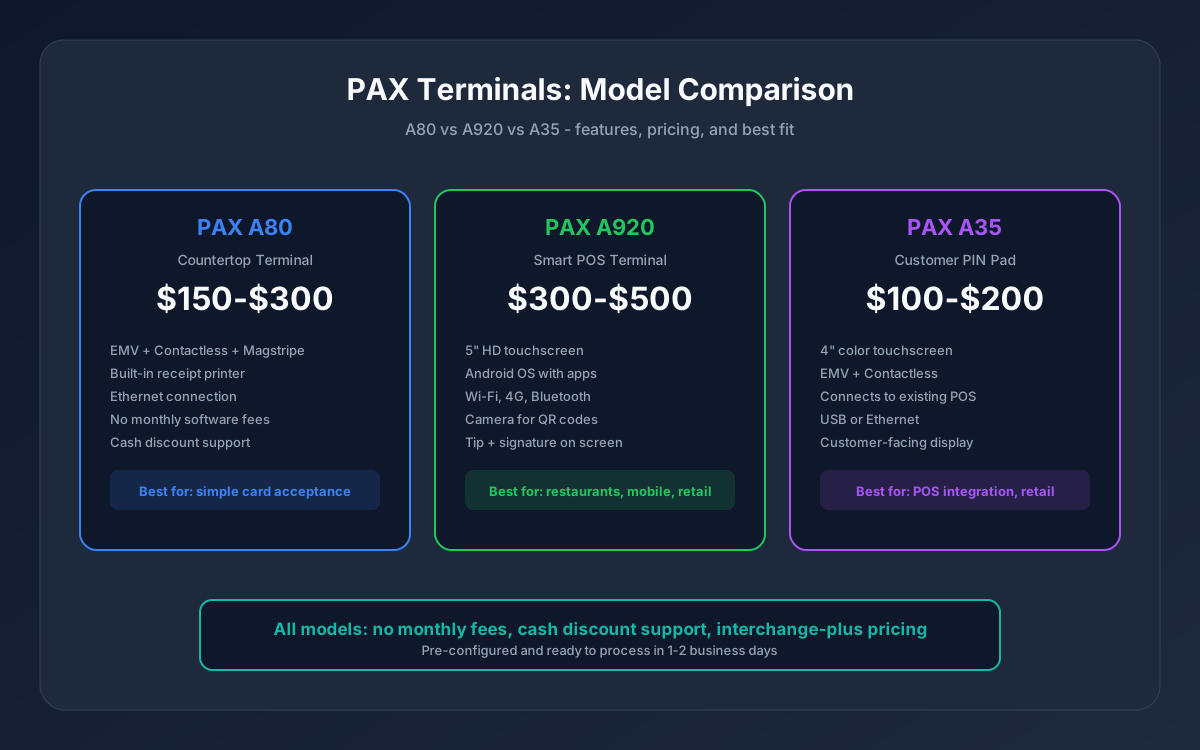
PAX Technology makes reliable, cost-effective payment terminals used by hundreds of thousands of businesses worldwide. The three most popular models are the A80 (countertop), A920 (smart touchscreen POS), and A35 (customer-facing PIN pad). Pricing ranges from $100 to $500 depending on the model, and all support EMV chip, contactless, and magstripe payments.
If you are choosing a PAX terminal for your business, the decision comes down to what you need beyond basic card acceptance: just transactions (A80), apps and touchscreen features (A920), or integration with an existing POS system (A35).
PAX A80: The Workhorse Countertop Terminal
The A80 is PAX's most popular countertop terminal. It handles the core job -- accepting card payments -- without unnecessary complexity.
Key features:
- EMV chip, contactless (NFC/tap-to-pay), and magstripe
- Built-in receipt printer
- Ethernet and dial-up connectivity
- Fast transaction processing (2-3 seconds)
- Compact countertop footprint
Best for: Retail stores, restaurants, service businesses, and any merchant who needs a reliable terminal without touchscreen apps or advanced POS features. The A80 is the right choice when your POS or register system handles everything else and you just need a payment terminal.
Typical cost: $150-$300 (purchase, not lease)
What it does not do: no touchscreen, no app marketplace, no built-in inventory management. It is a dedicated payment terminal, not a POS system.
PAX A920: The Smart POS Terminal
The A920 is PAX's Android-based smart terminal. It combines payment acceptance with a touchscreen interface and app capabilities.
Key features:
- 5-inch HD touchscreen
- Android-based operating system with app support
- EMV chip, contactless, and magstripe
- Built-in camera (for QR code scanning)
- Wi-Fi, 4G, and Bluetooth connectivity
- Built-in receipt printer
- Tip adjustment on screen
- Signature capture
Best for: Restaurants (tip on screen), retail stores wanting basic POS features without a full system, mobile businesses, and merchants who want more functionality than a traditional terminal but do not need a full Clover-style POS.
Typical cost: $300-$500
How it compares to Clover: The A920 is less expensive than Clover hardware and has no monthly software fees. However, Clover offers a deeper app ecosystem, more hardware options (Station, Mini, Flex, Go), and more advanced reporting. For a detailed comparison, see our Clover vs Square guide -- many of the same decision factors apply when comparing Clover to PAX.
PAX A35: The Customer-Facing PIN Pad
The A35 is not a standalone terminal -- it is a customer-facing PIN pad that connects to your existing POS system or register.
Key features:
- 4-inch color touchscreen
- EMV chip and contactless
- Customer-facing display for amount confirmation and signature
- Connects via USB or Ethernet to your POS
- Compact design for counter placement
Best for: Businesses using a separate POS system (like a cloud-based register) that need a dedicated customer-facing payment device. Common in retail, grocery, and hospitality where the POS handles inventory and the A35 handles payment.
Typical cost: $100-$200
Model Comparison
| Feature | A80 | A920 | A35 |
|---|---|---|---|
| Type | Countertop terminal | Smart POS | PIN pad |
| Touchscreen | No | Yes (5 inch) | Yes (4 inch) |
| EMV + Contactless | Yes | Yes | Yes |
| Receipt printer | Yes | Yes | No (POS prints) |
| App support | No | Yes (Android) | No |
| Wi-Fi / 4G | No (Ethernet) | Yes | No (USB/Ethernet) |
| Camera | No | Yes | No |
| Standalone use | Yes | Yes | No (requires POS) |
| Cash discount support | Yes | Yes | Yes |
| Typical cost | $150-$300 | $300-$500 | $100-$200 |
PAX vs Other Terminal Brands
PAX vs Clover: Clover is a full POS ecosystem with software, apps, and advanced reporting. PAX terminals are payment-focused hardware. If you need inventory management, employee scheduling, and detailed analytics, Clover is the better fit. If you need a reliable terminal at a lower cost with no monthly software fees, PAX wins.
PAX vs Dejavoo: Both are traditional terminal manufacturers. PAX generally has a broader model range and more Android-based options. Dejavoo is strong in cash-heavy and high-volume retail environments. Both support cash discount programs and interchange-plus pricing through Unison. For Dejavoo-specific guidance, see our Dejavoo terminals guide.
PAX vs Ingenico: Ingenico has been a long-standing terminal brand but was acquired and has shifted focus. PAX has gained significant market share as a more modern, cost-effective alternative. Both offer EMV and contactless, but PAX's Android-based models (A920) provide more flexibility.
Setting Up a PAX Terminal
1. Choose your model based on the comparison above 2. Order through your processor -- Unison provides PAX hardware pre-configured with your merchant credentials, pricing (interchange-plus), and any programs (cash discount, surcharging) 3. Connect to your network -- plug in Ethernet (A80) or connect to Wi-Fi (A920) 4. Run a test transaction -- verify the terminal processes, prints receipts, and shows the correct business name 5. Train your staff -- PAX terminals are intuitive, but a 10-minute walkthrough covers card insertion, tap-to-pay, voids, and refunds
Most merchants are processing within 1-2 days of receiving their terminal. For cash discount configuration, see our POS cash discount setup guide.
The Bottom Line
PAX terminals offer the best value for businesses that need reliable payment hardware without the cost and complexity of a full POS system. The A80 is the go-to for straightforward card acceptance. The A920 adds a touchscreen and apps for businesses that want more. The A35 pairs with existing POS systems as a customer-facing PIN pad.
All PAX models work with interchange-plus pricing through Unison, support cash discount programs, and come with no monthly software fees or leasing.
**Contact Unison or call (925) 290-6003** to order PAX terminals pre-configured for your business. Free setup, no contracts.