Quick Answer
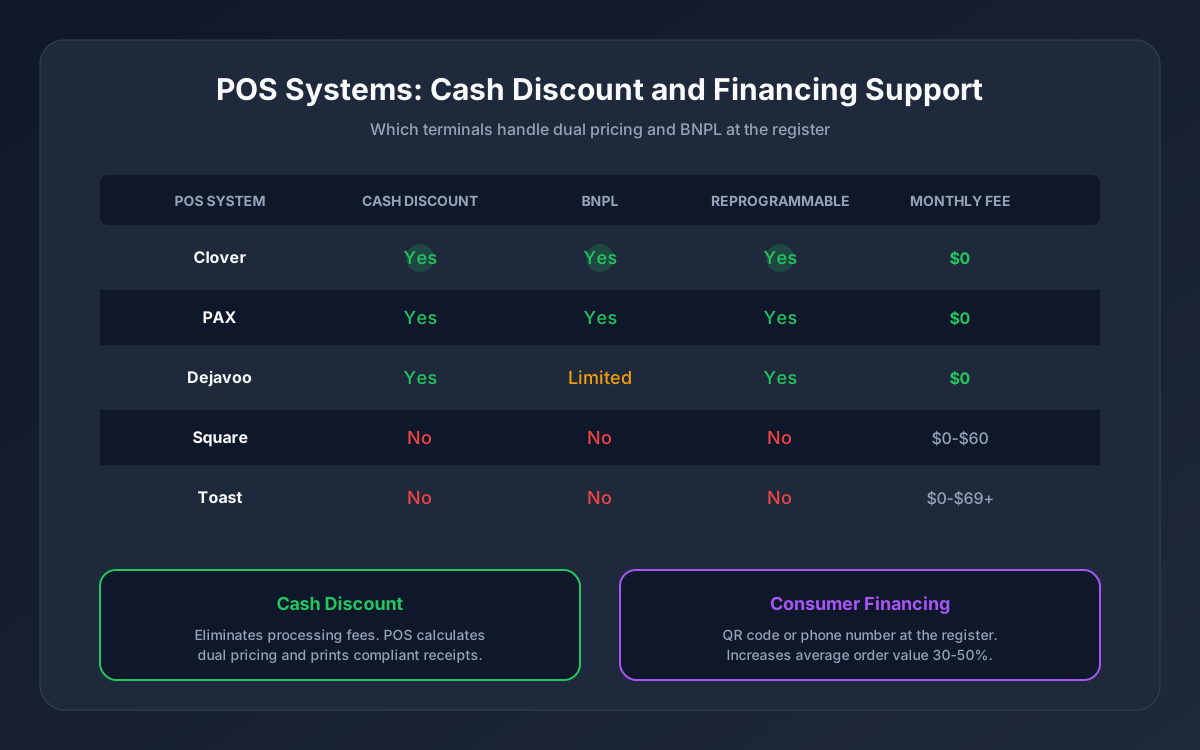
Clover, PAX, and Dejavoo POS systems support cash discount programs with proper configuration. Consumer financing (BNPL) can be added at the register through your processor's partnerships with Affirm, Afterpay, or similar providers. Most existing terminals can be reprogrammed for dual pricing without buying new hardware.
If you want to eliminate processing fees, offer customer financing, or both, your POS system needs to support these features at the hardware and software level. Not all do. Here is what works, what does not, and how to get set up.
What "Built-In Cash Discount" Actually Means at the POS
A POS system with cash discount support does three things automatically:
1. Calculates the dual price -- When a product is scanned or entered, the system knows both the card price (higher, includes the service fee) and the cash price (lower, the discounted amount) 2. Applies the correct price based on payment method -- If the customer pays cash, the discount is applied. If they pay by card, the full posted price is charged. No manual adjustment by the cashier. 3. Prints a compliant receipt -- The receipt shows the discount as a separate line item for cash transactions, satisfying disclosure requirements
This is not a workaround or a manual override. A properly configured cash discount POS handles the entire flow without any extra steps from your staff. The cashier rings up the sale, the customer pays, and the system does the rest.
For background on how cash discount programs work and why they are legal, see our cash discount program overview. For the comparison with surcharging and convenience fees, see our full breakdown.
Which POS Hardware Supports Cash Discount
Not every terminal handles dual pricing. Here is what supports it and what does not:
Clover POS
Clover terminals (Flex, Mini, Station, Go) support cash discount through software configuration. Unison pre-configures Clover hardware for dual pricing before shipping, so the program is active from the first transaction. If you already own a Clover, your processor can often reprogram it remotely.
Best for: Restaurants, retail stores, and service businesses that want a full-featured POS with built-in dual pricing. For a detailed comparison of Clover vs other options, see our Clover vs Square breakdown.
PAX Terminals
PAX terminals (A80, A920, A35) support cash discount through processor-level configuration. PAX hardware is common in high-risk and high-volume environments because of its reliability and broad processor compatibility.
Best for: High-volume retail, convenience stores, and businesses that need a durable terminal with no monthly software fees.
Dejavoo Terminals
Dejavoo terminals support dual pricing and are frequently used in cash-heavy environments like smoke shops, auto repair shops, and small retail. They are cost-effective and straightforward to configure.
Best for: Small businesses, smoke shops, and merchants who want a simple terminal focused on transactions rather than software features.
What does NOT support cash discount
Square does not support cash discount programs. Square's software handles processing through Square's own flat-rate pricing model and does not allow third-party processing or dual pricing configuration. If you want cash discount, you need to move off Square. For a full comparison, see our Clover vs Square guide.
Toast POS -- Toast locks merchants into Toast Payments and does not support third-party cash discount programs.
Generic "smart" terminals -- Some cheap Android-based terminals technically display dual prices but lack compliant receipt formatting. Compliance matters -- using non-compliant hardware exposes you to card network violations.
| POS System | Cash Discount Support | Reprogrammable | Monthly Software Fee | Notes |
|---|---|---|---|---|
| [Clover](/hardware/clover) | Yes (all models) | Yes (remote) | $0 through Unison | Full-featured POS + cash discount |
| PAX | Yes (most models) | Yes | $0 | Reliable, no software fees |
| Dejavoo | Yes | Yes | $0 | Budget-friendly, simple |
| Square | No | No | N/A | Locked to Square Payments |
| Toast | No | No | $0-$69+ | Locked to Toast Payments |
Adding Consumer Financing (BNPL) at the Register
Cash discount eliminates your processing fees. Consumer financing increases your average sale. They solve different problems and can run together on the same POS.
How BNPL works at a physical register
The customer flow is simpler than most merchants expect:
1. Cashier rings up the sale normally 2. Customer chooses to finance -- either by scanning a QR code displayed at the register or giving their phone number 3. BNPL provider runs an instant approval -- takes 10-30 seconds 4. Customer confirms the installment plan on their phone 5. Transaction completes -- you receive full payment (minus the BNPL fee) within 1-3 business days
The customer walks out with their purchase. They pay the BNPL provider over 4-12 installments. You have no involvement in collections, no credit risk, and no delayed payment.
Which BNPL providers work at the register
- **Affirm** -- works in-store via QR code or phone number lookup. Best for purchases over $100. Offers longer payment plans (3-12 months).
- **Afterpay** -- "Pay in 4" model. Customer pays 25% today, three more payments over 6 weeks. Best for purchases under $1,000. Strong brand recognition with younger shoppers.
- **Klarna** -- flexible options from "Pay in 4" to longer financing. Growing in-store presence.
For a complete comparison of BNPL options, costs, and which is right for your business size and customer base, see our Buy Now Pay Later for Merchants guide.
Can high-risk merchants offer BNPL at the register?
Yes, but availability depends on your product category and your processor's BNPL relationships. A smoke shop selling vape hardware or a supplement store selling premium stacks can offer financing if the BNPL provider accepts the product category. The integration goes through your processor, not a direct signup with the BNPL company. For the full picture on high-risk BNPL options, see our guide on BNPL for high-risk merchants.
Running Cash Discount and Financing Together
Some merchants want both: eliminate processing fees with cash discount AND offer financing to increase ticket size. The two programs are compatible but work on different transactions.
Here is how they interact:
- Cash/debit customer -- receives the cash discount. No BNPL involved.
- Card customer -- pays the posted (card) price. Processing fee is offset by the service fee built into that price.
- BNPL customer -- the BNPL provider pays you the full card price. You pay the BNPL provider fee (2-6%). The cash discount does not apply because the BNPL provider is paying by card on the customer's behalf.
The net effect: your processing costs on regular card transactions drop to near zero through cash discount, and your average order value increases through BNPL. The BNPL fee applies only to financed transactions, which are a subset of total sales.
Setup Walkthrough: Getting Started
Step 1: Evaluate your current hardware
If you already own a Clover, PAX, or Dejavoo terminal, it may only need reprogramming. Contact your processor to check compatibility. If you are on Square or Toast, you will need to switch hardware and processing.
Step 2: Choose your programs
Decide whether you want cash discount only, BNPL only, or both. Most retail businesses start with cash discount (immediate savings) and add BNPL later based on customer demand and average ticket size.
Step 3: Configuration and training
Your processor handles terminal programming, signage, and receipt setup. Staff training typically takes 15-20 minutes. The system does the heavy lifting -- your team just needs to know how to explain the program to customers and how to process a BNPL transaction.
Step 4: Go live
With pre-configured hardware, most merchants are processing within 3-7 business days of placing the order. Reprogrammed existing terminals are typically ready in 1-3 business days.
The Bottom Line
Your POS system should work as hard as you do. If it cannot handle cash discount, you are paying thousands in processing fees you do not need to pay. If it cannot offer financing, you are losing sales to competitors who can. The right hardware with the right configuration handles both.
Before buying a new terminal or signing up with a new POS provider, check whether your current setup can be reprogrammed. You may be one configuration change away from eliminating your processing costs entirely.
**Contact Unison at (925) 290-6003** for a free POS evaluation. We will check your current hardware, recommend the right setup for cash discount and financing, and get you processing in under a week.