Modern POS systems have replaced traditional cash registers in nearly every business category. A modern POS does everything a cash register does — ring up sales, store cash, print receipts — while adding credit card processing, inventory management, employee tracking, sales reporting, and customer management that cash registers simply cannot provide.
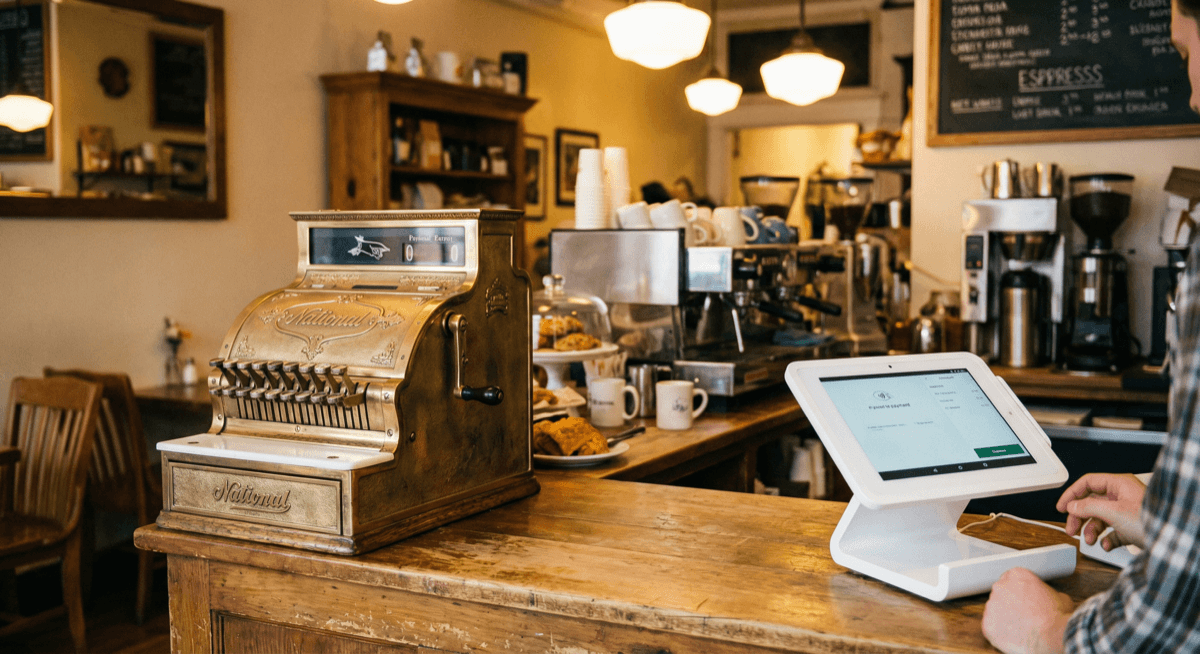
Cash Register vs Modern POS System
| Feature | Traditional Cash Register | Modern POS System |
|---|---|---|
| Ring up sales | Yes | Yes |
| Accept credit cards | No (separate terminal needed) | Built-in |
| Inventory tracking | No | Real-time stock counts and alerts |
| Sales reporting | Basic daily totals | Hourly, daily, weekly, by item, by employee |
| Employee management | No | Clock-in/out, permissions, tip tracking |
| Customer data | No | Purchase history, loyalty, marketing |
| Online ordering | No | Integrated |
| Receipt options | Paper only | Paper, email, text |
| Price | $100-500 | $299-1,500 |
Why Businesses Are Upgrading
Credit card acceptance is no longer optional. Over 80% of consumer transactions in the U.S. are now cashless. A business that only accepts cash is losing sales — customers expect to tap or insert a card. Modern POS systems include integrated card readers for chip, contactless, and mobile wallet payments.
Inventory management saves time and money. Instead of manual counting, a POS automatically adjusts stock levels with every sale. You get low-stock alerts, reorder point notifications, and accurate cost-of-goods tracking. Most businesses that switch from registers to POS discover they were losing 2-5% of revenue to inventory shrinkage they didn't know about.
Sales data drives decisions. Which items sell best? What time is your busiest hour? Which employee generates the most revenue? A cash register gives you a daily total. A POS gives you actionable intelligence.
Best POS Systems to Replace Your Cash Register
Clover Mini — Best Direct Upgrade
The Clover Mini is the most natural upgrade from a cash register. It has a similar countertop footprint, but replaces the register's mechanical keys with a 7-inch touchscreen. Built-in card reader, receipt printer, and cash drawer connection.
Price: Starting around $299 Monthly: $0-15/month for software Processing: Interchange-plus pricing (2.1-2.8%)
This is the upgrade that makes the most sense for cafes, delis, convenience stores, and small shops still using cash registers.
Learn more about Clover Mini →
PAX A920 — Best Budget Portable Option
If you don't need a cash drawer and want something handheld, the PAX A920 smart terminal is a complete POS in your hand. Touchscreen, receipt printer, card acceptance — all in one device.
Price: Starting around $249 Monthly: $0-10/month Processing: Interchange-plus pricing
Learn more about PAX terminals →
Clover Station Duo — Best Full Upgrade
When you're ready for the full transformation, the Clover Station Duo gives you a dual-screen POS with every feature: inventory management, employee management, customer loyalty, online ordering integration, and detailed analytics.
Price: Starting around $1,199 Monthly: $15-50/month Processing: Interchange-plus pricing
Learn more about Clover Station →
How to Migrate from Cash Register to POS
The transition is simpler than most business owners expect. Here's a step-by-step migration plan:
Week 1: Setup and configuration 1. Choose your POS system (contact Unison for a free consultation) 2. Receive hardware (shipped within 1-2 business days) 3. Enter your product catalog — item names, prices, categories, and barcodes 4. Set up employee accounts with roles and permissions 5. Configure your receipt format and business information
Week 2: Staff training and parallel operation 1. Train staff on the new system (most learn in 1-2 hours) 2. Run both systems in parallel for a few days — ring up sales on both the old register and new POS to build confidence 3. Verify daily totals match between both systems 4. Practice common scenarios: refunds, voids, shift changes, end-of-day closeout
Week 3: Full switchover 1. Retire the cash register 2. Connect the cash drawer to the POS 3. Start processing card payments through the POS 4. Begin using inventory tracking for new sales 5. Conduct a full inventory count to establish starting quantities
What about your existing standalone card terminal? If you currently use a separate credit card terminal alongside your cash register, you can cancel that terminal service once your POS is processing cards. The POS replaces both the register and the terminal — one device instead of two.
The Cost of NOT Upgrading
Every month you use a cash register instead of a POS, you're likely losing money in three ways:
1. Lost card sales — over 80% of consumer transactions are now cashless. Customers who don't carry cash will go to a competitor who accepts cards. 2. Inventory shrinkage — theft and waste you can't track without a POS. Most businesses discover 2-5% of revenue was being lost to untracked shrinkage. 3. Overpaying for processing — if you use a standalone terminal, you're probably on flat-rate pricing (2.6%+) instead of interchange-plus (2.1-2.8%)
For a business doing $30,000/month in sales, upgrading from a cash register to a Clover POS with interchange-plus pricing saves an estimated $100-200/month in processing costs alone (see our POS system cost guide for the full math). The POS pays for itself within 3-6 months.
Ready to upgrade? Contact Unison for a free POS consultation →. Call (925) 290-6003.
Related resources:
- POS Hardware — explore all POS systems
- POS System Cost Guide — complete pricing breakdown
- Best POS for Restaurants — restaurant-specific guide
- Best POS for Retail — retail-specific guide